

Completing a Bachelor of Computer Applications (BCA) does not mean you must become a software developer. If you are exploring BCA Without Coding career options, several opportunities allow you to use your computer knowledge, communication skills, analytical thinking and creativity without writing programs every day. Students researching the best online bca courses bangalore also benefit from understanding these career possibilities before choosing a degree or planning their next step.
From business analysis and software testing to digital marketing and IT support, employers need professionals who can solve problems, understand technology and help businesses operate effectively. The important thing is to identify a role that matches your strengths and develop the skills required for it.
This guide explores 12 career options, indicative salaries in India, essential skills, career progression and further-study opportunities. Whether you have recently graduated or are a working professional considering a career change, you can use it to identify a practical direction.
Is a Career After BCA Possible Without Coding?
Yes. Many organisations employ BCA graduates in positions where programming is not the main responsibility. These roles may involve understanding software, analysing information, helping customers, coordinating teams, maintaining systems or improving digital experiences.
Your BCA background can be valuable because you already have exposure to computer applications, databases, operating systems, networks and the broader IT environment. You can build on that foundation instead of starting from scratch.
However, there is one important distinction: not every technology-related job is completely free from coding. Data analysis may involve SQL, software testing can progress into automation, and technical support may require scripting at advanced levels. Your goal should be to choose a position in which programming is not a daily core responsibility.
For example, someone who enjoys explaining technical concepts may be more comfortable as a technical writer. A graduate who likes investigating problems may prefer quality assurance, while a person who enjoys organising information might explore business analysis.
If you are still evaluating the degree itself, read this guide to BCA after 12th and its career opportunities to understand how the qualification can support different career directions.
The 12 Best Jobs After BCA Without Coding: At a Glance
Rather than choosing a job only because it appears popular, consider what you would actually do during a working day. The following roles offer different combinations of technology, communication, organisation and creativity.

| Job role | Main responsibility | Coding requirement |
| 1. Business Analyst | Understand business needs and document solutions | Low; usually not central |
| 2. Manual Software Tester | Check applications for errors and usability issues | Little or none initially |
| 3. IT Support Specialist | Resolve computer and software problems | Usually low |
| 4. Technical Writer | Explain technical information clearly | Usually none |
| 5. Digital Marketing Executive | Manage online campaigns and performance | Usually none |
| 6. SEO Specialist | Improve website visibility in search engines | Usually low |
| 7. UI/UX Designer | Improve how people use digital products | Low; depends on the role |
| 8. Data Analyst | Interpret information and create reports | Low to moderate; SQL is common |
| 9. Project Coordinator | Track tasks, deadlines and communication | Usually none |
| 10. Customer Success Specialist | Help customers use software successfully | Usually none |
| 11. IT Recruiter | Identify and coordinate suitable technology candidates | None |
| 12. Network Support Associate | Troubleshoot connectivity and network issues | Usually low |
These are not interchangeable careers. Each requires a different mix of skills, and some employers may expect additional qualifications or experience. The right choice depends on the work you enjoy, the tools you are willing to learn and the opportunities available in your preferred location.
1. Business Analyst: Turn Business Problems into Solutions
Imagine a company receiving repeated complaints that its online ordering process is confusing. The developers know how the application works, but someone must first understand what customers are struggling with, gather requirements and explain what needs to improve.
That is where a business analyst can contribute.
Business analysts connect business teams, customers and technical teams. They gather information, document requirements, study workflows and help stakeholders understand possible solutions. Their work involves more investigation and communication than software development.
What you may do:
- Speak with stakeholders to understand business requirements.
- Document processes, problems and expected outcomes.
- Prepare requirement documents and workflow diagrams.
- Coordinate with technical teams during implementation.
- Help assess whether a proposed solution meets business needs.
Skills to develop: Excel, documentation, logical thinking, presentation skills, basic process mapping and tools such as Jira or Confluence.
Career growth: Junior Business Analyst → Business Analyst → Senior Business Analyst → Business Analysis Lead or Product Owner.
This career may suit you if you enjoy asking questions, understanding how organisations work and explaining complex problems in simple language. Basic SQL or technical knowledge may be helpful in some positions, but advanced programming is not universally required.
2. Manual Software Tester: Find Problems Before Users Do
A shopping application may look attractive and still contain problems. A payment button might fail, a password reset might not work or an order confirmation might display incorrect information.
Manual testers identify these issues by testing software against expected behaviour. They follow test scenarios, record defects and communicate findings to the development team.
For graduates considering BCA Without Coding, manual testing can be an accessible way to enter the software industry without immediately pursuing a developer role.
What you may do:
- Test websites, applications and software features.
- Follow test cases and record results.
- Reproduce errors and prepare defect reports.
- Verify whether reported problems have been fixed.
- Check usability, compatibility and expected functionality.
Skills to develop: Attention to detail, test-case writing, defect reporting, basic software development lifecycle knowledge and tools such as Jira.
Career growth: Manual Tester → QA Analyst → Senior QA Analyst → QA Lead.
Some testing positions require SQL, API testing or automation knowledge as you progress. Start with manual testing fundamentals, but remain open to learning additional technical skills if your career goals require them.
3. IT Support Specialist: Help People Solve Technology Problems
When an employee cannot access an account, connect to a printer or open an essential application, an IT support specialist helps identify and resolve the problem.
This role is particularly relevant to BCA graduates who understand computers but prefer practical troubleshooting over software development.
The work can involve direct communication with users, diagnosing technical issues, configuring devices and escalating complicated problems to specialist teams.
Skills to develop: Windows or Linux fundamentals, networking basics, troubleshooting, ticket management, customer communication and knowledge of common business applications.
Career growth: IT Support Associate → Desktop Support Specialist → Systems Administrator or IT Operations Specialist.
Entry-level support roles can be a starting point for broader IT operations careers. As your experience grows, you may choose to specialise in cloud support, systems administration or cybersecurity operations. Those advanced positions can require additional technical knowledge.
4. Technical Writer: Make Complex Technology Easy to Understand
Not every technology professional needs to build software. Some must explain how it works.
Technical writers prepare user guides, help articles, product documentation, installation instructions and troubleshooting resources. They often work with developers, product teams and subject-matter experts to turn complicated information into clear explanations.
Consider a new employee using an unfamiliar business application. A well-written guide can help that employee complete a task without repeatedly contacting support.
Skills to develop: Written communication, research, document structure, editing, attention to detail and tools such as Microsoft Word or Confluence.
Career growth: Junior Technical Writer → Technical Writer → Senior Technical Writer → Documentation Lead.
This career can be a strong match if you enjoy writing, researching and organising information. You do not necessarily need to be a programming expert, but you must understand the product well enough to explain it accurately.
5. Digital Marketing Executive: Connect Businesses with Online Audiences
Businesses use websites, social media, search engines, email and digital advertising to reach potential customers. Digital marketing professionals help plan, execute and measure these activities.
A BCA graduate may bring useful digital skills to this field, particularly when working with website analytics, campaign platforms and content-management systems.
Typical responsibilities:
- Help plan digital campaigns.
- Coordinate social media and website content.
- Monitor traffic, engagement and campaign performance.
- Assist with email marketing and paid advertising.
- Prepare reports and recommend improvements.
Skills to develop: Content planning, communication, basic design tools, campaign analysis and familiarity with Google Analytics and advertising platforms.
Career growth: Digital Marketing Executive → Digital Marketing Specialist → Campaign Manager → Digital Marketing Manager.
This option is worth exploring if you enjoy a mix of creativity and measurable results. Coding is generally not a core requirement, although basic website knowledge can help when collaborating with developers.
6. SEO Specialist: Help the Right Audience Find a Website
Search engine optimization (SEO) focuses on helping relevant pages become more visible in search results. An SEO specialist researches search intent, reviews website content, identifies technical issues and measures organic performance.
For example, an education website may want students searching for online degree programmes to find useful and relevant course information. An SEO specialist helps the website align its content and structure with that goal.
Skills to develop: Keyword research, search intent analysis, on-page optimisation, content auditing, internal linking, Google Search Console and analytics.
Career growth: SEO Executive → SEO Specialist → SEO Strategist → SEO Manager or Organic Growth Lead.
SEO does not normally require daily programming, but understanding website structure, page speed, indexing and HTML basics can be useful. Some technical SEO positions require deeper technical expertise.
If you enjoy research, content strategy and understanding why people search for particular information, this career may be a better fit than software development.
7. UI/UX Designer: Improve the Experience of Using Technology
A digital product can have excellent features and still frustrate users. Small design decisions—such as the placement of a button, the wording of an error message or the order of a form—can affect how easily people complete tasks.
UI/UX designers help make websites and applications clearer, more accessible and easier to navigate.
UI design focuses on the visual interface, while UX design considers the overall experience, including user needs, research, task flows and usability.
Skills to develop: User research, wireframing, prototyping, visual hierarchy, usability testing and tools such as Figma.
Career growth: Junior UI/UX Designer → UI/UX Designer → Senior Designer → Design Lead.
A portfolio is particularly important in this field. You can create sample projects that demonstrate how you identify a user problem, develop possible solutions and explain your design decisions.
Coding is not generally essential for a design-focused role, though familiarity with HTML and CSS can help you communicate with developers.
8. Data Analyst: Explain What the Numbers Mean
Businesses collect information about sales, website visits, customer behaviour, operations and finances. Data analysts help organisations interpret that information and make better decisions.
The role is often associated with programming, but many entry-level analytical tasks begin with spreadsheets, reporting tools and visual dashboards. Still, you should expect some positions to require SQL or other technical skills.
Skills to develop: Excel, data cleaning, charts, Power BI or Tableau, basic statistics and the ability to explain findings clearly.
Career growth: Junior Data Analyst → Data Analyst → Senior Data Analyst → Analytics Lead.
Imagine an online retailer noticing that sales have fallen in one region. A data analyst may compare sales reports, product categories and customer trends to identify possible reasons.
This role suits people who enjoy working with numbers and finding patterns. If your goal is to avoid all coding, check job descriptions carefully: SQL is common in analytical roles, even when Python is not required.
9. Project Coordinator: Keep Teams and Deadlines on Track
Technology projects involve more than building a product. Teams must manage tasks, meetings, approvals, dependencies and deadlines.
Project coordinators help keep this work organised. They update project trackers, follow up with team members, prepare meeting notes and communicate progress to stakeholders.
Skills to develop: Planning, communication, time management, spreadsheets, task tracking and project tools such as Trello, Asana or Jira.
Career growth: Project Coordinator → Project Analyst or Assistant Project Manager → Project Manager → Programme Manager.
This role may suit you if you are organised, dependable and comfortable communicating with different people. It can provide exposure to how technology projects are delivered without requiring you to develop the software yourself.
However, project management is not an automatic next step after graduation. Employers may expect relevant experience, strong coordination skills and evidence that you can manage competing priorities.
10. Customer Success Specialist: Help Customers Get Value from Software
Software companies need professionals who can help customers use their products successfully. Customer success specialists guide users through onboarding, explain features, answer questions and identify opportunities to improve customer satisfaction.
Unlike a purely technical development role, this position combines product knowledge with communication and relationship management.
Skills to develop: Product demonstrations, customer communication, problem-solving, CRM tools, presentation skills and basic data interpretation.
Career growth: Customer Success Associate → Customer Success Specialist → Customer Success Manager → Customer Success Lead.
For example, a company may subscribe to a business application but use only a small part of its features. A customer success specialist helps the team understand the product, adopt relevant features and resolve obstacles.
This can be a useful path for BCA graduates who understand technology and enjoy helping people. Some roles involve sales targets or account growth, so read the responsibilities carefully before applying.
11. IT Recruiter: Match Technology Talent with Employers
IT recruiters help organisations identify and hire suitable candidates for technology-related positions. They coordinate with hiring managers, review applications, communicate with candidates and support the recruitment process.
A BCA background can help you understand basic terminology when discussing positions such as software tester, network engineer, database administrator or business analyst.
Skills to develop: Communication, candidate sourcing, interview coordination, recruitment software, professional writing and basic IT role knowledge.
Career growth: Recruitment Coordinator → IT Recruiter → Senior Recruiter → Talent Acquisition Lead.
This career is worth considering if you enjoy conversations, organisation and working with people. Programming is not required, but you should understand the difference between technical roles well enough to identify relevant candidates.
Some recruitment positions include targets linked to hiring volume or timelines. Your comfort with a fast-paced, people-oriented environment is therefore important.
12. Network Support Associate: Keep Systems Connected
Organisations depend on reliable networks for communication, online services, file sharing and daily operations. Network support associates help diagnose connectivity problems and maintain the systems that allow devices to communicate.
Their work may include checking network access, assisting with router and switch configurations, monitoring incidents and escalating complex faults.
Skills to develop: Networking fundamentals, IP addressing, DNS, DHCP, troubleshooting, operating-system basics and network simulation tools.
Career growth: Network Support Associate → Network Administrator → Network Engineer → Network Operations Specialist.
This is a technical career, but it does not normally centre on software development. It is more suitable for people who enjoy investigating why systems are not working and learning how computer networks operate.
Advanced networking roles may require certifications and deeper technical skills. If you prefer to avoid programming rather than avoid technical learning altogether, network support is worth exploring.
Salary, Skills and Career Growth: What Can You Expect?
Choosing a career is easier when you understand what entry-level work may pay and how the role can develop. Salary should be one factor in your decision, not the only one.
The figures below are indicative planning ranges for India, not guaranteed salaries or verified averages for every employer. Actual compensation depends on the company, city, experience, qualifications, practical skills and responsibilities. Entry-level positions in smaller organisations may pay less than specialist positions at larger employers.
| Job role | Indicative annual salary for entry-level candidates | Skills that can improve growth |
| Business Analyst | ₹2.5–5 lakh | Requirements analysis, Excel, stakeholder communication |
| Manual Software Tester | ₹2–4.5 lakh | Test cases, defect reporting, QA processes |
| IT Support Specialist | ₹2–4 lakh | Troubleshooting, operating systems, networking |
| Technical Writer | ₹2.5–5 lakh | Documentation, research, editing |
| Digital Marketing Executive | ₹2–4.5 lakh | Campaign analytics, content strategy, advertising |
| SEO Specialist | ₹2–4.5 lakh | Search analysis, technical SEO, reporting |
| UI/UX Designer | ₹2.5–5 lakh | Research, Figma, prototyping, portfolio |
| Data Analyst | ₹3–5.5 lakh | Excel, dashboards, SQL, analytical reasoning |
| Project Coordinator | ₹2.5–4.5 lakh | Planning, reporting, team coordination |
| Customer Success Specialist | ₹2.5–5 lakh | Product knowledge, communication, CRM |
| IT Recruiter | ₹2–4.5 lakh | Sourcing, candidate screening, recruitment tools |
| Network Support Associate | ₹2–4.5 lakh | Networking, troubleshooting, certifications |
These ranges are broad estimates for career planning rather than a promise of what a fresher will receive. They should be checked against current vacancies and employer requirements before you make a decision.
For a more personalised estimate, compare job listings in your preferred city, noting the experience level and required skills. The Government of India’s National Career Service is a useful starting point for exploring employment opportunities and career guidance.
Which skills can improve your earning potential?
The same job title can cover very different levels of responsibility. A junior SEO executive who mainly updates page titles may have a different salary from an SEO specialist who manages technical audits and reports business outcomes.
Likewise, an IT support employee who resolves routine tickets may have different prospects from someone who can troubleshoot networks, manage access controls and support cloud-based systems.
Focus on building evidence of ability in your chosen field:
- Analytical careers: Practise spreadsheet analysis, reporting and clear explanations of findings.
- Communication careers: Prepare writing samples, presentations or documentation.
- Creative careers: Build a portfolio that explains your decisions, not just your final designs.
- Operations careers: Demonstrate troubleshooting, accurate records and systematic problem-solving.
- Coordination careers: Show that you can organise tasks, communicate updates and follow through on commitments.
Employers may value a relevant certification, but it should support practical ability rather than replace it.
How to Choose the Right Career for Your Personality
You do not have to select a career based on what is trending on social media. Start by observing which types of tasks you enjoy and which ones you can imagine doing regularly.
Consider these everyday situations:
- You enjoy investigating why a process is failing. Business analysis, quality assurance or IT support may suit you.
- You like writing explanations and simplifying difficult ideas. Consider technical writing or SEO.
- You enjoy visual creativity and thinking about how people use applications. Explore UI/UX design.
- You like numbers, patterns and reports. Data analysis may be worth investigating.
- You prefer communicating, organising and helping people. Project coordination, customer success or IT recruitment could be suitable.
- You like understanding devices and how they connect. Explore network support.
A simple career-fit comparison
| If you enjoy… | Explore these roles first | Build your first proof of skill |
| Investigating problems | Business Analyst, Manual Tester | A requirement document or test report |
| Writing and research | Technical Writer, SEO Specialist | A help article or content audit |
| Design and creativity | UI/UX Designer, Digital Marketing | A prototype or campaign plan |
| Numbers and patterns | Data Analyst, Business Analyst | A spreadsheet report or dashboard |
| Helping and coordinating | Customer Success, Project Coordinator, IT Recruiter | A customer guide, project tracker or sourcing exercise |
| Technical troubleshooting | IT Support, Network Support | A documented troubleshooting lab |
This comparison is a starting point, not a strict classification. You may enjoy more than one category, and many careers combine these skills.
Before committing to a course, try a small task from the field. Write a short software help guide, test a sample website, create a basic dashboard or prepare a project tracker. A few hours of practical exploration can reveal more about your preferences than reading dozens of job titles.
What Should You Learn Before Applying for Your First Job?
A BCA provides academic foundations, but employers often need evidence that you can use your knowledge in practical situations. Your preparation should therefore combine core skills, relevant tools and examples of completed work.
Step 1: Choose one role to target
Avoid trying to learn everything at once. Select one primary career and one closely related alternative.
For example, a student interested in software quality could target manual testing and consider application support as a related option. Someone interested in writing could target technical documentation and explore content or SEO roles.
Step 2: Learn the tools used in that role
Choose tools based on actual job descriptions rather than collecting certificates without a plan.
A business analyst may need Excel, process diagrams and requirements documentation. A designer may need Figma and usability principles. A technical writer may need documentation tools and editing skills.
Step 3: Create a small portfolio
You do not need a commercial client to demonstrate your ability. You can create a clearly labelled practice project using sample data or a hypothetical business problem.
Examples include:
- A business requirements document for an online booking system.
- A manual testing report for a sample website.
- A dashboard using publicly available or synthetic data.
- A redesigned checkout screen with an explanation of usability improvements.
- A technical guide explaining how to use an application.
- A digital campaign plan with objectives and sample performance measures.
Be honest about what you created and whether the project was academic, self-directed or completed for an employer.
Step 4: Prepare for interviews
Practise explaining your decisions. Employers may ask how you would prioritize a problem, communicate with a difficult customer, investigate an error or present a finding to someone without a technical background.
Clear explanations and structured thinking can distinguish candidates who have simply completed a course from those who understand how to apply what they learned.
Step 5: Apply consistently and learn from feedback
Tailor your résumé to the job description. Highlight relevant projects, tools, internships and transferable skills rather than listing every subject studied during BCA.
Keep track of applications and common interview questions. If employers repeatedly ask for a skill you lack, use that feedback to guide your next learning activity.
For additional learning opportunities, explore the Government of India’s National Institute of Electronics and Information Technology (NIELIT), which provides information about its technology education and training offerings. Check the individual programme details to determine whether a course matches your career goal.
Should You Study Further After BCA or Start Working?
There is no single right answer for every graduate. Some students are ready to apply for entry-level roles, while others may benefit from additional study before choosing a specialisation.
If you need income or workplace experience, applying for suitable jobs while developing one relevant skill can be a practical approach. If your target role requires deeper knowledge, a postgraduate qualification or a specialised course may help you build that foundation.
When should you consider an MCA?
A Master of Computer Applications (MCA) can be worth considering if you want to deepen your knowledge of computer applications, software systems, databases or related technical areas.
However, an MCA is not automatically necessary for every non-coding career. Business analysis, digital marketing, technical writing, customer success and recruitment often depend more directly on role-specific skills and experience.
If you are exploring mca distance education bangalore, compare the curriculum, learning format, eligibility requirements, assessment methods and recognition status of each programme. Do not assume that every distance or online MCA follows the same structure or offers the same specialisations.
Likewise, researching the best online mca courses should involve more than comparing advertisements or fees. Review the subjects covered, practical learning opportunities, academic support and the relevance of the qualification to your intended career.
When might a short course be enough?
If you already have a BCA and know which job you want, a focused course may be a more direct starting point than another full degree.
For instance:
- A manual testing course can introduce test planning and defect reporting.
- A digital marketing course can help you practise campaign planning and analytics.
- A UI/UX course can provide structured design exercises and portfolio projects.
- An Excel or business intelligence course can help you practise reporting and visualisation.
- A networking course can help you strengthen infrastructure fundamentals.
A certificate alone does not guarantee employment. Choose learning that includes exercises, assessments or projects you can demonstrate to an employer.
How to evaluate further-study options
Students comparing online degree colleges in bangalore should examine the actual awarding institution, programme details, recognition and support available to learners.
The same principle applies when researching online degree courses in bangalore or comparing online degree courses in karnataka. Location-related search terms can help you discover options, but the quality and suitability of the specific programme matter more than the wording of an advertisement.
You can start by reading What Is BCA? Course Details and Career Scope to revisit the academic foundation, and Affordable Online BCA Course: Study from Anywhere for a discussion of flexible study options.
When comparing programmes, look for:
- A clearly identified awarding university or institution.
- Programme-specific approval and recognition information.
- Subjects relevant to your intended career.
- Transparent fee and assessment details.
- A study schedule you can realistically maintain.
- Practical learning and academic support where applicable.
Students considering technology-focused education can also explore career-oriented online courses to compare broader learning directions.
How Indian College of Correspondence Can Fit into Your Education Planning
Choosing a career and choosing an educational institution are related decisions, but they are not the same decision. First identify the type of work you want to pursue. Then consider whether you need a degree, a specialised course, practical experience or a combination of these.
Indian College of Correspondence can be part of your education research when you are comparing learning pathways and considering how further education fits your goals. Before enrolling in any programme, verify the exact qualification, awarding institution, eligibility conditions, delivery format and applicable recognition requirements.
If you are a working professional, flexibility and a manageable study schedule may be particularly important. If you are a recent graduate, you may want to balance additional education with job applications and portfolio development.
Indian College of Correspondence should be considered within that broader decision-making process rather than as a substitute for checking whether a particular qualification meets your needs.
For more information about the wider education landscape and available resources, visit Sophia Online Degree College. You can also explore its blog and career guidance articles for related learning topics.
A Practical First-Month Plan for Moving Towards Employment
You do not need to master an entire profession before applying for your first job. A focused month of preparation can help you identify gaps, practise the basics and produce a first piece of work to discuss in interviews.
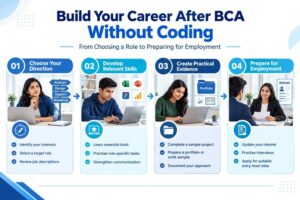
Week 1: Decide on your direction
Choose one primary role and one backup. Read several current job descriptions and write down the skills employers repeatedly request.
Week 2: Learn the essentials
Practise the most important tools and concepts for your target role. Focus on understanding and application rather than collecting multiple unrelated certificates.
Week 3: Produce one useful project
Create a sample report, test document, design prototype, help article or project tracker. Document your approach and the decisions you made.
Week 4: Prepare and apply
Update your résumé, practise interview answers and apply for relevant entry-level openings. Use feedback to plan your next round of improvement.
Treat this as a starting framework rather than a deadline. Some careers require longer preparation, and your pace may depend on whether you are studying, working or managing other responsibilities.
The Government of India’s Digital India programme is another useful resource for understanding the country’s wider digital transformation context. For career planning, connect that broader context to actual vacancies and the specific skills employers request rather than assuming that every digital trend translates into an immediate job opportunity.
Final career advice: Choose progress over pressure
The most suitable job after BCA is not necessarily the one with the highest advertised salary. It is the one that matches your interests, offers realistic entry opportunities and gives you room to build valuable skills.
You do not need to become a programmer to make use of your computer applications degree. However, you should be prepared to keep learning, practise the tools used in your chosen profession and demonstrate what you can do.
If you are still deciding which direction to take, you can also read BCA Cloud Computing Scope in 2026: Jobs, Salary & Future Growth to compare a more technical career path with the non-coding options discussed in this article.
Indian College of Correspondence encourages learners to approach education and career planning with a clear understanding of their goals. As you evaluate your next step, compare the available programmes, the skills you need and the time you can realistically invest in your development.
For students and working professionals exploring further education, Indian College of Correspondence can be included in your research into academic pathways. Always verify programme-specific details before enrolling.
Frequently Asked Questions
1. Which is the best job after BCA without coding?
Business analyst, manual software tester, technical writer, digital marketing executive, UI/UX designer and IT support specialist are all options worth exploring. The best choice depends on your interests, strengths and the skills required by employers.
2. Can I get a job after BCA without programming knowledge?
Yes. Several entry-level roles focus on communication, documentation, testing, customer support, design or coordination rather than programming. You may still need basic technical knowledge, and requirements vary by employer.
3. Which non-coding job after BCA has good salary potential?
Business analysis, data analysis, UI/UX design and project management-related careers can offer growth opportunities as you gain experience. Salaries vary considerably, and some of these roles require technical tools or specialised skills even when coding is not the main responsibility.
4. Can a BCA fresher become a business analyst?
Yes, some organisations recruit fresh graduates for junior business analysis or analyst trainee positions. Building skills in Excel, documentation, process mapping and communication can help you prepare for these opportunities.
5. Is an MCA necessary for non-coding jobs after BCA?
No. An MCA may be useful for particular technical or academic goals, but it is not mandatory for every career listed here. Relevant skills, projects, experience and employer requirements should guide your decision.
6. Which skills should I learn first after BCA?
Start with the skills required for your target role. For example, learn testing fundamentals for QA, Figma for UI/UX, Excel for analytical work, or documentation and editing for technical writing. Avoid learning several unrelated tools at the same time.
7. Can I pursue online education while working?
Depending on the programme’s eligibility, schedule and learning format, online education can offer flexibility for working professionals. Check the programme structure, assessments, recognition and expected study time before making a decision.
8. How can I find entry-level jobs after BCA?
Use reputable job portals, company career pages, internships and career services. Tailor your résumé to each role, create relevant project samples and practise interview questions. The National Career Service also provides employment and career guidance resources.
Take the Next Step Towards Your Career
You have several options after BCA, even if software development is not your preferred path. The next step is to choose a direction, understand the skills employers expect and start building practical evidence of your ability.
If further education is part of your plan, compare the available programmes carefully before deciding. Indian College of Correspondence can be part of your education research as you consider suitable learning options alongside your career goals.
Explore Sophia Online Degree College for information about educational pathways, and review the programme details that match your academic background and future plans.