

The technology behind a banking app, an online shopping platform, a college portal or a food delivery service is built by people who turn ideas into working digital products. If you enjoy solving problems, exploring technology or understanding how applications work, a career in software could be worth considering. Choosing the right education pathway, including the best online MCA courses, can help graduates and working professionals develop relevant knowledge while planning their next career step.
However, entering the technology industry is not only about learning to code. Employers may look for problem-solving ability, communication, teamwork, technical fundamentals and evidence that you can apply what you have learned. Your ideal starting point will depend on your current qualification, the kind of work you enjoy and the time you can commit to learning.
This guide explores software-related career roles, the skills to develop, courses to consider, salary expectations and practical ways to prepare for employment in India. It also explains how to compare study options so that you can make an informed decision instead of choosing a course based on its title alone.
Every Digital Product Has a Story Behind It
Think about the last time you used an online payment service, booked a ticket or attended a virtual meeting. You interacted with a finished product, but several processes helped make that experience possible.
A team may have planned the product, designed its interface, written the code, tested its features, connected it to databases and deployed it to a server. Other professionals may monitor performance, manage cloud infrastructure, resolve security concerns and improve the product after users begin using it.
This is why software-related careers are broader than a single job title. Some professionals focus on writing code, while others work on testing, application support, data, infrastructure or product quality.
The work also changes depending on the organisation. A developer at a small company might contribute to several parts of an application, whereas a developer at a large organisation may specialise in one service or technology.
For students and graduates, this variety creates different entry points. You do not need to master every technology before beginning. A better approach is to build a strong foundation, choose a direction and gradually develop the skills required for that role.
What Happens Between an Idea and a Working Application?
A digital product generally passes through several stages before it reaches its users. Understanding these stages helps you recognise which type of work might suit you.
First comes the problem. A business may want to reduce the time customers spend booking appointments or make it easier for employees to access internal information. The team needs to understand the problem before deciding what to build.
Next comes planning and design. Product teams identify requirements, map user journeys and decide how the application should behave. Designers may create interface layouts, while developers consider how different features will work together.
Then comes development. Programmers write instructions that allow the application to perform its intended tasks. Depending on the project, they may use languages such as Java, Python, JavaScript or C#.
Testing follows. A feature that works in one situation may fail in another. Testers and developers check whether the product behaves correctly, identify defects and verify that changes have not broken existing features.
Finally, the product is released and maintained. Applications need updates, performance monitoring and fixes as user needs and business requirements change. Cloud and operations teams may help ensure services remain reliable.
These stages are connected, but they do not all require the same skills. If you enjoy investigating problems, software testing might interest you. If you like creating user-facing features, application development may be a better fit. If you prefer managing systems and infrastructure, cloud or operations roles could be worth exploring.
Explore the Career Roles Behind Modern Software
Software-related work includes both technical and support-oriented positions. The best role for you will depend on your interests, current skills and willingness to learn.
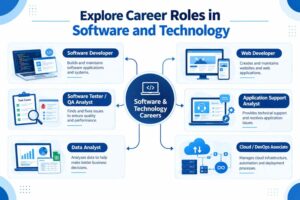
| Career role | Typical responsibilities | Useful starting skills |
| Software Developer | Builds, updates and maintains applications | Programming fundamentals, debugging, data structures |
| Web Developer | Creates and maintains websites and web applications | HTML, CSS, JavaScript, responsive design |
| Software Tester / QA Analyst | Checks software quality and reports defects | Test cases, attention to detail, analytical thinking |
| Application Support Analyst | Investigates application issues and helps users | Troubleshooting, SQL basics, communication |
| Data Analyst | Organises and interprets data to support decisions | Excel, SQL, data visualisation, basic statistics |
| Cloud / DevOps Associate | Supports deployment, infrastructure and software delivery | Linux basics, networking, cloud fundamentals |
| Cybersecurity Analyst | Helps identify and respond to security risks | Networking, operating systems, security fundamentals |
These roles are examples rather than guaranteed entry-level destinations. Job titles and requirements vary between employers, and some positions require experience or additional technical preparation.
Software Developer
Developers build features, fix defects and maintain applications. They often collaborate with designers, testers, analysts and other developers to ensure that a product meets its requirements.
A beginner can start with one programming language, practise writing small programs and learn how to debug errors. As confidence grows, projects can introduce databases, APIs, version control and software design principles.
Web Developer
Web developers create websites and browser-based applications. Front-end developers focus on what users see and interact with, while back-end developers work on server-side logic, data processing and application services. Some developers work across both areas.
This pathway can be useful for learners who want visible project outcomes, such as a portfolio website, booking form or simple online store.
Software Tester or QA Analyst
Testing professionals help teams discover problems before software reaches users. Their work can include following test cases, recording defects, checking application behaviour and retesting fixes.
Attention to detail, clear documentation and logical thinking are important. Learners may begin with manual testing concepts before exploring automation tools and programming.
Application Support Analyst
Support analysts investigate reported issues and help maintain the smooth functioning of business applications. They may examine error messages, check system logs, use SQL queries or escalate technical problems to development teams.
This role may appeal to people who enjoy troubleshooting and communicating with users. The technical requirements vary depending on the application and employer.
For a more detailed look at a related pathway, read career opportunities after MCA.
Which Technical Skills Should You Learn First?
A common mistake is trying to learn several programming languages, frameworks and cloud platforms simultaneously. This can create the impression that technology is difficult because there is always another tool to study.
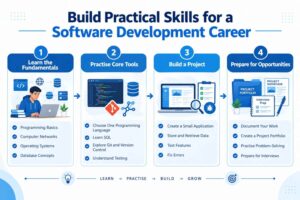
A more manageable strategy is to build skills in layers.
Start with computing fundamentals. Understand how operating systems, files, networks, applications and databases work. These concepts help you make sense of technical problems even when you change tools later.
Choose one programming language. Python can be approachable for beginners, while Java and C# are also widely used in application development. JavaScript is especially useful when you want to create interactive websites. Your choice should reflect the role you want to explore rather than online popularity alone.
Learn how data is stored. SQL and relational database concepts are useful across development, testing, reporting and application support. Learn how tables, records, keys and basic queries work.
Practice version control. Tools such as Git help developers track changes, collaborate and maintain project history. Even a small personal project can introduce these habits.
Develop debugging and testing skills. Learn to reproduce an error, inspect what happened, isolate the likely cause and verify the fix. This process is central to many technical jobs.
Improve communication. You may need to explain an issue, document a change, ask for clarification or discuss a technical decision with someone who is not a developer. Clear communication supports effective teamwork.
The National Institute of Electronics and Information Technology (NIELIT) is one useful place to explore information about computing and electronics-related training and programmes.
Learn by building, not only by watching
Online tutorials can explain concepts, but projects help you discover what you understand and where you need more practice.
Start with something small: a task tracker, personal portfolio, expense calculator, student record system or basic inventory application. Write down what the project should do, build one feature at a time and test each part.
Once the first version works, improve it. Add validation, handle errors, make the interface easier to use or document how the application works. These improvements show that you can think beyond simply following a tutorial.
If you are currently studying BCA or considering that pathway, this guide to IT skills to learn alongside BCA can help you identify complementary areas to practise.
Build a Project That Shows What You Can Do
A project portfolio gives you a practical way to demonstrate your learning. It does not have to contain a large number of applications. Two or three well-explained projects can be more useful than a long list of unfinished tutorials.
Consider a simple project such as an appointment-booking application. You could begin by creating a page that displays available appointments. Next, add a form for users to request a booking. Then introduce data storage, input validation and clear error messages.
This one project can help you practise several concepts:
- Programming: Write the logic that handles user actions.
- Database skills: Store and retrieve booking information.
- Testing: Check valid, invalid and unexpected inputs.
- User experience: Make the process understandable and accessible.
- Documentation: Explain the purpose, features and limitations of the application.
For every project, describe the problem it solves, the tools you used, the decisions you made and the improvements you would like to add. If you worked with other people, explain your own contribution honestly.
You should also learn to use version control and keep project files organised. Where possible, include screenshots or a demonstration and provide instructions for running the project. Never include confidential employer data, private user information or credentials in a public portfolio.
A portfolio cannot guarantee an interview or job offer. It can, however, give you a concrete way to discuss your skills during applications and interviews.
Which Course Should You Choose for a Technology Career?
Your course choice should reflect your current education level and the role you want to pursue. A degree can provide structured academic learning, while additional projects and practical exercises help you apply that knowledge.
| Learning route | Who may consider it | What to evaluate |
| BCA | Students seeking an undergraduate computing qualification | Eligibility, programming subjects, duration, assessment and recognition |
| B.Sc. in IT or a related computing field | Learners interested in information technology foundations | Curriculum, laboratory or practical components, academic eligibility |
| MCA | Graduates seeking postgraduate computer application studies | Admission requirements, programming depth, specialisations and project work |
| Short-term technical training | Learners building a specific skill alongside formal study or work | Course outcomes, practical exercises, instructor support and relevance |
| Self-directed project learning | Students and professionals strengthening their portfolio | Learning resources, consistency, feedback and evidence of practical ability |
The right route is not the same for everyone. An undergraduate student may need a broad academic foundation, while a graduate who already has relevant computing knowledge may be ready to compare postgraduate options.
If you are considering an MCA
A Master of Computer Applications can be relevant for graduates who want to deepen their knowledge of computing and application development. However, eligibility requirements differ by institution, so check the accepted undergraduate qualifications and any subject or mathematics conditions before applying.
When comparing the best online MCA courses, look beyond the course name. Review the curriculum, academic recognition, admission rules, examination format, project requirements, faculty support and total fees. Make sure the course fits your existing qualification and your available study time.
Learners searching for MCA distance education bangalore should also check the specific programme’s current mode of delivery and approval status rather than assuming every distance or online programme has the same recognition.
If you are considering a BCA
A BCA may suit students who want an undergraduate pathway focused on computer applications. Compare subjects across semesters and look for a balance of programming, databases, computer networks, software concepts and practical work.
Students comparing best online BCA courses bangalore should verify the institution’s current programme details, eligibility, assessment structure and support arrangements. The course title alone will not tell you how much practical experience you will gain.
If you are comparing other study options
Searches for online degree courses in Bangalore and online degree courses in Karnataka can produce a wide range of programmes. Shortlist courses according to the qualification you need, the subjects you want to study and whether the learning format fits your schedule.
Similarly, bsc it distance learning may be a search phrase worth exploring if you want to compare IT-related undergraduate options. Check the exact qualification, mode, curriculum and recognition of each programme before making a decision.
For students and working professionals, Sophia Online Degree College Bangalore can be a starting point for exploring relevant study options and asking questions about course pathways. Compare the details carefully and select a programme that supports your longer-term goals.
What Salary Can You Expect in India?
Salary is an important consideration when planning a career, but it should not be the only factor in choosing a course or job role. Earnings vary according to location, employer, technical depth, industry, experience and interview performance.
The figures below are broad illustrative ranges, not verified live averages or salary guarantees. Actual offers may fall below or above these ranges, and some entry-level roles may have different pay structures.
| Role or career stage | Illustrative annual salary range in India |
| Entry-level software or web developer | ₹2.5–6 lakh |
| Junior QA / software testing professional | ₹2.5–5.5 lakh |
| Application support analyst | ₹2.5–5.5 lakh |
| Junior data analyst | ₹3–7 lakh |
| Developer with several years of relevant experience | ₹6–15 lakh or more |
| Experienced specialist or technical lead | ₹12–25 lakh or more |
These ranges are indicative and may not represent the current market for every city or employer. Higher salaries usually depend on a combination of experience, demonstrated ability, role complexity and market demand; they are not automatic outcomes of completing a degree.
When evaluating job opportunities, consider the entire role. A position with strong mentorship, exposure to real projects and a clear learning path may offer useful long-term development even if its initial salary is not the highest available.
For a realistic picture, compare recent job advertisements for the specific role you want. Look at the listed skills, experience requirements and location, and use multiple sources rather than relying on a single salary estimate.
Where Are Software Professionals Employed?
Software skills are used across many industries. Technology companies build products and provide services, but organisations in other sectors also depend on software to manage operations and serve customers.
IT services and consulting: Professionals may develop, test, maintain or support applications for clients in different industries.
Banking and financial services: Teams work on digital banking, payment systems, internal applications, data management and security-related processes.
Retail and e-commerce: Software supports product listings, payments, inventory, order tracking and customer service.
Healthcare and education: Organisations use digital platforms for administration, scheduling, learning, records and communication. Work involving sensitive information also requires careful attention to privacy and security.
Start-ups and product companies: Smaller teams may offer opportunities to contribute to several parts of a product, although responsibilities and expectations vary widely.
Public-sector and digital initiatives: Government services increasingly rely on digital systems. The official Digital India programme provides context on India’s wider digital transformation efforts.
The growth of digital services does not mean every role is equally available in every location. Employers may require different levels of experience, specific tools or industry knowledge. Read job descriptions carefully to understand which requirements are essential and which are listed as preferences.
How Is the Industry Changing, and What Should Learners Watch?
Technology changes continuously, but learners do not need to chase every new tool. It is more useful to understand the fundamentals behind emerging trends and then explore the ones that match their interests.
Artificial intelligence and AI-assisted development
AI tools can help developers explore code examples, generate drafts, explain errors and automate some repetitive tasks. They can also produce incorrect or insecure results. Professionals still need to review output, test it and understand what the code does before using it.
Beginners should first learn programming fundamentals rather than relying on AI to produce every solution. A solid understanding makes it easier to evaluate suggestions and recognise mistakes.
For additional context, the official IndiaAI portal provides information about India’s artificial intelligence ecosystem and related initiatives.
Cloud computing and deployment
Applications increasingly depend on hosted infrastructure, managed databases and cloud-based services. Understanding basic networking, operating systems, deployment and access control can help learners explore cloud-related roles.
You do not need to begin with advanced cloud architecture. Start by learning what a server does, how an application communicates with a database and how software moves from development into a live environment.
Cybersecurity and software quality
Security is not only the responsibility of a dedicated security team. Developers, testers and support professionals all play a part in protecting applications and information.
Basic awareness of authentication, permissions, secure data handling and common vulnerabilities can improve your technical foundation. The level of security knowledge required will depend on your chosen role.
Data and automation
Organisations use data to monitor performance, understand customers and improve decisions. SQL, spreadsheets, statistics and visualisation can complement software skills, especially for people interested in analytics, reporting or operational roles.
Automation is also changing routine tasks. Instead of treating automation as a reason to avoid learning, understand how it can be used responsibly and where human review remains important.
The practical lesson is simple: focus on transferable concepts first. Tools may change, but the ability to learn, test, communicate and solve problems remains useful across many technical roles.
How to Choose Your Starting Point
Before enrolling in a course or committing to a learning plan, take time to understand your current position. A decision that suits a school graduate may not suit a working professional who already has an undergraduate degree.
Use the following steps to organise your decision:
- Write down your current qualification. Note the subjects you studied, your existing technical knowledge and any eligibility requirements you may need to meet.
- Choose two or three roles to investigate. Compare their day-to-day responsibilities rather than selecting a career based only on its title or salary.
- Review real job advertisements. Identify the skills employers repeatedly request and separate beginner requirements from those intended for experienced candidates.
- Compare courses carefully. Examine the syllabus, admission rules, recognition, learning format, assessment method, fees and student support.
- Try a small practical project. A short project can help you discover whether you enjoy coding, testing, data analysis or troubleshooting.
- Create a realistic study routine. Plan around your existing commitments and leave time for revision and practice, not just watching lessons.
- Review your progress. After completing a project or course module, identify what you can do independently and what still needs work.
Do not assume that the most expensive programme is automatically the best or that a short course can replace every form of formal education. Each learning route serves a different purpose. Your task is to find the one that meets your academic needs and helps you develop skills relevant to your chosen direction.
Sophia Online Degree College Bangalore is one option to explore while researching suitable study pathways. Before making a decision, verify the details of the specific programme you are considering and ask the institution about eligibility, delivery, assessments, academic recognition and fees.
Conclusion
Building a career in software requires more than choosing a course or learning a programming language. It involves developing technical fundamentals, practising through real-world projects and understanding the skills employers expect. Whether you are a student exploring your first degree or a working professional planning your next step, choose a learning path that matches your qualifications, interests and career goals.
Before enrolling, compare the curriculum, eligibility requirements, recognition, fees and practical learning opportunities offered by different programmes. Exploring the best online MCA courses may be a useful starting point for eligible graduates who want to strengthen their knowledge of computer applications, while undergraduate options may suit those beginning their academic journey.
Sophia Online Degree College Bangalore can be one of the options you explore when researching suitable degree pathways. Visit SODC to review available programmes, or contact us for guidance on choosing a course that aligns with your educational background and future plans.
Frequently Asked Questions
1. Is software development a good career option in India?
It can be a suitable career for people who enjoy logical thinking, problem-solving and continuous learning. Opportunities vary by role, experience, location and market conditions, so research current job descriptions before deciding which path to pursue.
2. Can I enter a software-related career without being an expert programmer?
Yes, some roles place greater emphasis on testing, application support, data handling or technical troubleshooting. However, the required technical knowledge differs by employer, and learning basic programming concepts can be useful across many technology roles.
3. Which programming language should beginners learn first?
Python, Java and JavaScript are possible starting points. Python can be approachable for general programming, Java is used in many application environments, and JavaScript is important for interactive web development. Choose based on your learning goals and practise consistently.
4. Is BCA enough to start a technology career?
A BCA can provide a foundation in computer applications, but employability also depends on practical skills, projects, communication and the requirements of specific jobs. Review job advertisements to identify the additional skills you may need to develop.
5. Should I pursue an MCA after BCA?
An MCA may be worth considering if you want further academic study in computer applications and meet the programme’s admission requirements. Compare the curriculum, fees, recognition, learning format and project opportunities before enrolling.
6. How do I compare the best online MCA courses?
Compare the exact syllabus, eligibility criteria, academic recognition, duration, assessment format, faculty support, project work and total cost. Confirm that the programme fits your previous qualification and intended career direction instead of choosing solely by name or marketing claims.
7. Can I study technology while working full-time?
It may be possible if the course format and your schedule are compatible. Review live-session requirements, assignment deadlines, examination arrangements and the weekly time commitment before enrolling. Set aside regular practice time so that learning does not remain limited to theory.
8. How important are projects when applying for entry-level jobs?
Projects can help demonstrate how you apply technical concepts. Explain the problem, your contribution, the tools used and the challenges you solved. A project is not a guarantee of employment, but it can give you concrete examples to discuss during an interview.
9. Are online or distance degrees automatically recognised?
No. Recognition depends on the institution, programme and applicable regulatory requirements. Verify the specific programme’s current status through reliable official sources and the institution’s published documentation before enrolling.
Take the Next Step Towards Your Technology Career
A technology career starts with a clear direction, a suitable learning foundation and consistent practice. You do not have to learn every tool at once. Begin by identifying the roles that interest you, compare the education options available to you and build small projects that demonstrate your growing ability.
If you are comparing undergraduate or postgraduate pathways, Sophia Online Degree College Bangalore can be part of your research. Review the programme details carefully and contact us if you need help understanding the available study options, eligibility requirements or next steps.
The most useful course is one that matches your circumstances, supports your learning goals and gives you a realistic way to build the knowledge you need for your chosen career.